What to log for every AI agent run

 By Inès L. and Noah Schmidt8 min read
An AI agent that works in a demo has proven one thing: it can work once. Production asks a harder question. When it gets something wrong, can you say what happened and why?
If the answer is no, you do not have a system you run. You have one you hope about. What closes that gap is a record of every run that somebody outside your team could read months later.
The short version
- Your monitoring dashboard is not an audit trail. Different reader, different clock, different rules.
- Standard AI tracing records no prompts or answers by default. You have to turn that on.
- Never sample an audit trail. The run you must explain will be in the part you dropped.
- Log every tool call and its result, the branch taken, the cost, and who approved.
- For approvals, record what the person actually saw, not just that they clicked yes.
A dashboard is not an audit trail
They look similar and they are not the same artifact. A dashboard is read by its author, minutes later, with the incident still fresh. A trail is read by an indifferent or hostile stranger, months later, who cannot ask you a follow-up question.
| Monitoring dashboard | Audit trail | |
|---|---|---|
| Who reads it | You, minutes later | A third party, months later |
| Sampling | Normal, often 10 to 20% | Never |
| Content of prompts and answers | Usually off | On, for as long as you keep it |
| If a write fails | Log it and move on | The operation should fail |
| Ordering | Timestamps | A sequence number you assign |
| Can it change later | Yes, by design | No, append only |
| Failure mode | You debug slower | You cannot answer the question |
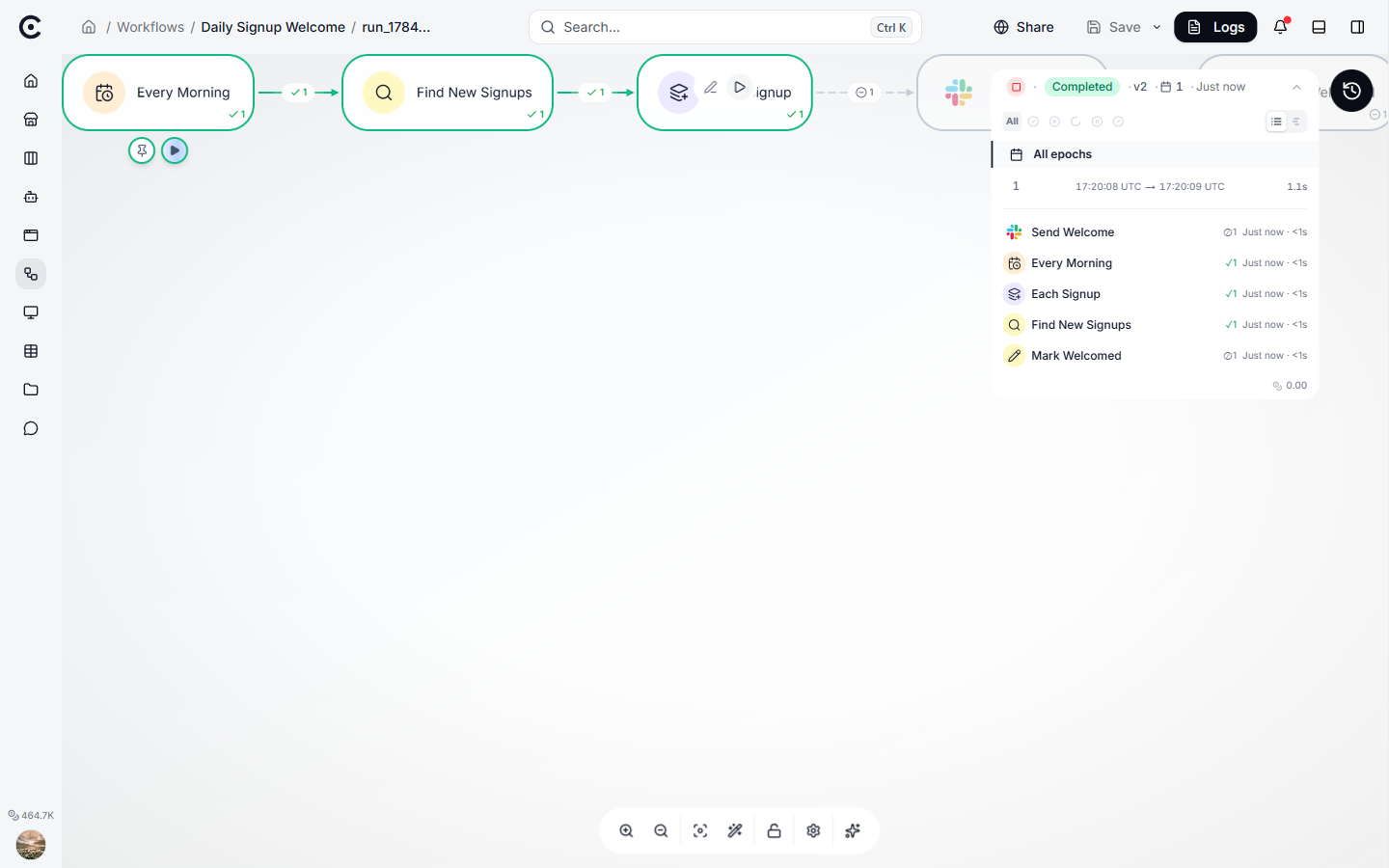
A run in the observability view: every step, its status, its timing, its cost. Genuinely useful, and still a dashboard rather than the durable record the rest of this article describes.
"We have tracing" does not mean "we have a trail"
This is the finding that catches most teams out.
The industry-standard conventions for tracing AI calls treat prompts, answers, tool arguments and tool results as opt-in, and the specification's own position is that tools should not capture them by default. So a fresh tracing setup gives you the model name, token counts, latency and a finish reason: none of the material that reconstructs a decision.
Turning content capture on is also fiddlier than a single switch in at least one popular implementation, where a second, barely documented setting has to be enabled as well. Check what your setup actually stores rather than assuming, and check it by reading a real record end to end.
The other half of the same problem is advice you will find in most observability guides: sample heavily at volume, and scrub content before it reaches the backend. Both are sound for monitoring and fatal for an audit trail. A 10% sample is worthless when the decision you have to defend is in the other 90%.
What to log for every run
One record per run. This is the header somebody reads first.
| What to record | Why it matters |
|---|---|
| A run id minted when the run is dispatched | Everything else hangs off it, and late-minted ids go missing |
| Who or what started it, and how | A person, a schedule, a webhook: it decides who is accountable |
| Start time and end time, as two timestamps | A duration cannot be lined up against an external timeline |
| Which model was billed and which actually ran | They can differ, and a trail recording one is wrong about the other |
| The prices in force at the time | So the cost still makes sense after the price list changes |
| Tokens in, tokens out, cached, and what it cost | Your bill, and your early warning |
| Status, and why it stopped | The claim you will be asked to defend |
| The config and policy version in force | Whether approval was required at all, at that moment |
| Which build was running | Did this run predate the fix |
| Whether an approval was required, and its reference | Empty must mean "not required", not "unknown" |
Two of those are worth insisting on. Two timestamps, not a duration, because only timestamps reconcile against someone else's records. And the prices in force, because model prices and model names change under you, and a cost you cannot reproduce is a cost you cannot defend.
One thing not to store: the full system prompt on every run. At ten thousand runs a day, a six-kilobyte prompt is around 20 GB a year of pure duplication. Store each version once and reference it.
What to log for every step
One record per model turn, tool call, decision or approval. These outnumber run records by roughly twenty-five to one and hold nearly all the payload.
| What to record | Why it matters |
|---|---|
| The order it happened in, assigned by the writer | Clock timestamps tie and reorder. A counter does not |
| Whether steps ran side by side | Reading a parallel batch as a causal chain is worse than a gap |
| What kind of step it was | Model turn, tool call, decision, approval |
| Tool name and call id | Correlates a request with its result across retries |
| The arguments and the result | The actual content, on whatever clock you keep content |
| A fingerprint of both | Lets you prove what was sent long after the content is deleted |
| How big the payload was | Tells a later reader that truncation happened, and by how much |
| Which branch it took | Makes the run replayable on paper |
| Why a step did not run | A skipped branch and a never-reached branch are different facts |
| Error code, separate from error message | Codes are queryable; messages leak the input that caused them |
| Whether redaction ran | Otherwise a clean-looking record proves nothing |
The fingerprint line is the quiet star of that table. Keeping a hash of what went in and came out costs a few bytes per step, and it lets you keep evidence for years while deleting the content itself in months. When somebody produces a document and claims your agent saw it, the hash settles it.
One caveat, so nobody gets this wrong: a hash of something guessable, like a postcode or a date of birth, can be reversed by trying every option. Salt those with a key you keep separately.
The approval record deserves its own row
If a human signs off, log that as a first-class record, not a flag on the run.
Record who approved, when, what channel it came through, how long it had before timing out, and, most importantly, what the approver actually saw. Freeze that text at the moment the run paused and keep it with the record. Without it, "a human approved" means nothing, because nobody can tell what they were approving.
Three small traps in the same area. An empty approval field has to mean "no approval was required by the policy in force", which means the policy version has to be recoverable. Default identities like "system" or "api" must be impossible for a real person to be called. And if your record shows an approver role, be sure something actually checked that role, or say plainly in the record that it did not.
Two mistakes that quietly ruin a trail
Writing it best-effort. If the audit write is fire-and-forget and failures are logged as non-critical, your trail thins out whenever the system is under stress: that is, during exactly the incidents you will be asked to explain. Coverage becomes correlated with system health, which is the worst possible property. Write the record in the same transaction as the thing it records.
Storing a duration but not the timeline. It sounds minor until an auditor asks you to line your record up against a customer's email timestamps, and you cannot.
Questions people ask
Is not my LLM provider logging all this?
They log their side of the call, for their retention period, in their format, and you cannot query it as evidence. The record you can defend is the one you keep.
Does logging everything not get expensive?
The skeleton (ids, times, statuses, counts, hashes, branches) is tiny, on the order of tens of gigabytes a year at ten thousand runs a day. Payload content is the expensive part, which is exactly why it goes on a shorter clock. That split is the subject of how long to keep it.
What about personal data in the logs?
Assume there is some, especially in error messages, which routinely echo the input that broke them. Keep identifiers pseudonymous, put content on a short clock, and keep the long-lived record down to hashes and codes.
How do I know my trail is good enough?
Take a run from last month and reconstruct it start to finish using only stored records. If you have to rerun anything or ask a colleague what happened, it is not good enough yet.
What to do next
Take one real run and try to explain it from the record alone. Whatever you find yourself guessing at is the next field to add. Then decide how long each part has to survive: how long to keep an AI agent audit trail.
Turn your niche data into a working automation
Describe the job in chat and Trinyx builds the workflow in front of you.
Start free