How to stop an AI agent from overspending

 By Théo P. and Inès L.8 min read
Most AI cost surprises have the same cause: an agent with no ceiling. It looped, it retried, it dragged a growing conversation behind it, and nobody found out until the invoice did.
The fix is not a smarter model or a tighter prompt. It is a limit that refuses the next call, and most things people call a budget do not do that.
The short version
- An alert tells you what you already spent. It is not a limit.
- Your provider's spend limit is usually a notification by default, not a hard stop.
- No budget can stop the call it is already making. The real worst case is your budget plus one call.
- Most agent frameworks ship with no cost limit at all, or one that counts calls rather than money.
- The test that matters: has your cap ever actually refused anything?
An alert is not a limit
A monitor runs after the money is gone. A limit runs before the next call and says no. Both are useful, but only one of them is a control.
| A monitor | A real limit | |
|---|---|---|
| When it runs | After the call settles | Before the next call starts |
| What it can do | Tell you | Refuse |
| Worst case | Unbounded | One more call |
| What it is for | Sizing the cap, spotting drift | Stopping the run |
Here is a test you can run today, and it needs no threshold: pull the denial records for your configured cap. Has it ever refused anything? A number that has never denied a single call is not a control, it is a comment.
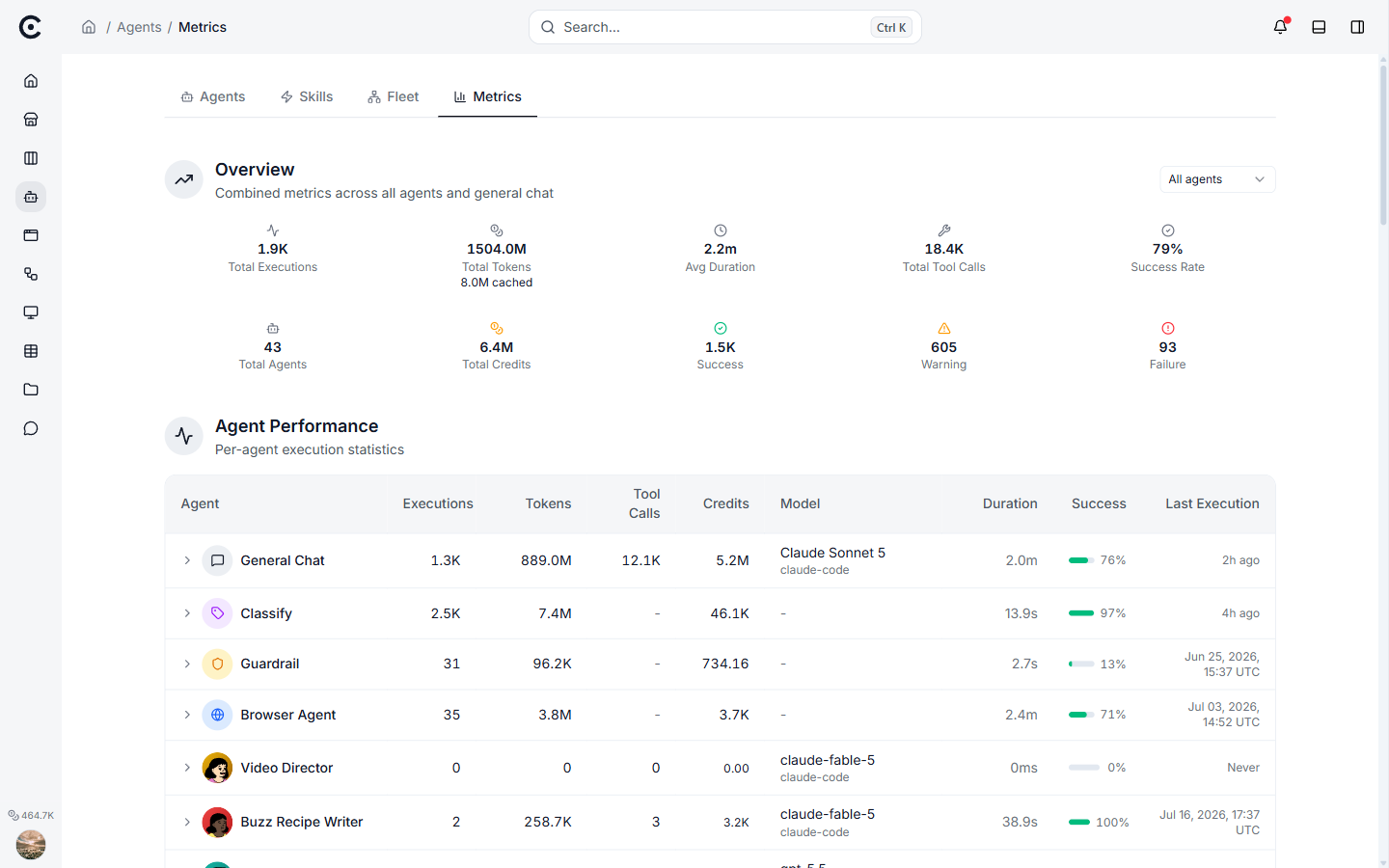
Spend per agent, after the fact. Exactly the right view for deciding what a cap should be, and exactly the wrong thing to rely on for stopping a run.
What your provider's spend limit actually does
People assume the number in their provider dashboard is a wall. Usually it is a doorbell.
| Provider control | What it really is |
|---|---|
| OpenAI project or org spend limit | A soft budget by default: it notifies, requests keep flowing. A hard stop exists as a separate opt-in toggle, which then rejects calls until you raise it |
| Anthropic Spend Limits API | Enterprise plans only, monthly only, and it covers people's seat usage rather than agent API spend |
| Anthropic per-tier monthly cap | A genuine ceiling, but org-wide and monthly, so one runaway run can turn a cost bug into an outage for everyone |
Sources: OpenAI's spend limits guide, Anthropic's Spend Limits API and rate limits. Anthropic's own documentation goes further and tells you not to gate on its spend figure at all: it may read as zero when the reading is unavailable, so treat it as informational.
Two conclusions follow. Provider caps are a backstop, not your first line of defence. And a monthly org-wide cap is the wrong shape for stopping one bad run, because by the time it fires it takes everything else down with it.
You cannot stop the call you are already making
This is the part every honest budget article has to say out loud.
You only know what a call cost after it has finished. So no in-run budget can prevent one expensive call from busting the cap. It can only prevent the next one. Your real worst case is the budget plus one call.
That has a practical consequence. If a single call can plausibly cost half your budget, your budget cannot work. A cap only behaves like a cap when it is comfortably larger than the biggest single call the agent could make, and a rough rule of three times is a sane floor. Sizing that properly is its own job: how much to budget per agent works through the numbers.
It also means a good implementation predicts before it spends. It looks at what the last steps cost, at how fast they are growing, and at the largest call this model could physically make, and it refuses when the projection would break the ceiling. Predicting is the whole trick, because measuring is always too late.
What the popular tools actually cap
If you assume your framework has your back, check. Most of them cap something other than money, and most default to no limit at all.
| Stack | What it limits | Default |
|---|---|---|
| Claude Agent SDK | Dollars per run, plus turns | Both unlimited |
| Anthropic Messages API | Tokens per response | No default, you must set it |
| OpenAI account | Dollars per month | Soft, notification only |
| OpenAI Agents SDK | Number of turns | 10 |
| LangGraph | Number of steps | Documented as 25 in some places and 1000 in others |
| LangChain middleware | Number of calls, no cost or token budget | No limit |
| Pydantic AI | Tokens, requests, tool calls | 50 requests, no token limit |
| CrewAI | Iterations | 20 or 25, depending which doc you read |
Three things worth pulling out of that table.
Almost everything defaults to unbounded. The safe assumption is that you have no ceiling until you set one.
Counting calls is not a budget. Ten calls can cost a cent or ten dollars depending on how much text each one carries. LangChain's middleware caps call counts and has no token or cost budget at all.
A cap that does not reach sub-agents is decorative. This is the most common way a ceiling turns out to be fake: a parent is configured with a limit, it spawns children, and the children run at the default. There are documented cases of exactly that in widely used frameworks. If you take one action from this article, make it this: set a parent limit, spawn a child, and prove the child inherits it.
Four rules for a budget that works
- Cap money or tokens, not steps. Steps float in price. Money does not.
- Give each step its own ceiling, and the whole run one too. A run that fans out into fifty parallel branches can stay inside every step budget and still cost fifty times what you expected.
- Reserve before spawning, do not interrupt mid-flight. Killing branches halfway leaves you a random half-finished result. Refusing to start is explicit and retryable.
- When the cap fires, keep the work. A stop that throws away everything done so far turns a cost problem into a total loss, and that is precisely why operators turn caps off.
That last one deserves a line of its own. A budget stop should return what the agent produced, plus the ledger of what it spent and why it stopped, and it should say which ceiling fired. A stop that just says "budget exceeded" gives you nothing to act on.
How bad does it actually get?
There is no published base rate for how often production agents run away, so treat any confident frequency with suspicion. What is documented is the magnitude, and it is smaller and more boring than the folklore.
Catalogued incidents cluster in the hundreds to low thousands of dollars: around $2,150 of unintended spend in one case, $235 in four days by a single user, a 70% overshoot past a set budget. Meanwhile the most-republished runaway story in the field, an anonymous "we spent $47,000 running AI agents", names no company, shows no invoice, and its own weekly figures add up to $25,658, not $47,000.
The real risk is not one spectacular invoice. It is a quiet, recurring, mid-four-figure leak that nobody attributes to anything, month after month.
Questions people ask
Does setting max tokens cap my costs?
Only the size of each answer. It does nothing about how many times the agent loops, which is where runaway cost actually comes from.
Should I use my provider's spend limit?
Yes, as a backstop, and turn on the hard version if your provider offers one. Just do not treat it as your control: it is usually monthly, org-wide, and soft by default.
What is a sensible starting budget?
One that is at least three times the largest single call the agent could make, otherwise it can be busted before it ever gets a chance to refuse. Start there, then size it against real runs.
My cap has never fired. Is that good?
It means the cap is untested, not that it works. Set a deliberately tiny budget on a test agent and confirm you get a clean, typed refusal that names the limit that fired.
Do loop detectors replace budgets?
No, they answer a different question. A loop detector bounds how many times something repeats. A budget bounds what those repetitions may cost. You want both.
What to do next
Check three things this week: does your cap cover money rather than call counts, does it reach sub-agents, and has it ever refused anything. Then pick the number itself with how much to budget per agent.
Turn your niche data into a working automation
Describe the job in chat and Trinyx builds the workflow in front of you.
Start free