How much should you budget for one AI agent?

 By Inès L. and Nora A.7 min read
You can set a budget on an AI agent. The hard part is knowing what number to put in the box. Too high and it never stops anything. Too low and it kills work that was going fine.
Here is how to get to a number you can defend, without a statistics degree.
The short version
- Start from what one step actually costs, not from what feels safe.
- Add margin based on how tool-heavy the step is: single-shot steps need about 2x, tool-heavy ones 3x to 4x.
- Limiting how many times an agent may loop is a terrible way to limit money.
- On cheap steps, cap the input. On expensive steps, cap the money.
- A run budget is not the sum of the step budgets, because steps repeat.
First, know what a step costs
Costs vary far more between kinds of work than most people expect. These are worked examples from a constructed model rather than measured traces, but the spread is the point.
| Kind of step | What it does | Typical cost per run |
|---|---|---|
| Classify | Reads a message, returns one label | about $0.0003 |
| Draft with lookup | Pulls a document, writes a reply | about $0.013 |
| Multi-tool research | Six or so tool calls, then a summary | about $0.27 |
| Summarise a long document | One big read, one answer | about $0.04 |
| Browser step | A dozen page actions, each adding a snapshot | about $1.67 |
A classify step and a browser step differ by more than a thousand times. One budget number across all of them is meaningless, which is why budgets belong per step rather than per agent.
Your margin is not 2x
Most people take the typical cost and double it. That is roughly right for a step that makes one model call and stops. It is badly wrong for anything that uses tools.
The reason is that each tool result gets carried into every later call, so cost does not grow in step with the number of tool calls. It grows faster. Doubling the tool calls on a tool-heavy step can roughly quadruple its cost.
| Kind of step | If it takes twice as many steps as usual | Margin to allow |
|---|---|---|
| One call, no tools | About twice the cost | 2x |
| Draft with a lookup or two | About three and a half times | 3x to 4x |
| Tool-heavy research or browsing | About four times | 3x to 4x |
The practical takeaway is the same either way: "let us bump max iterations a bit" is not a small change. It is a decision to roughly quadruple the ceiling.
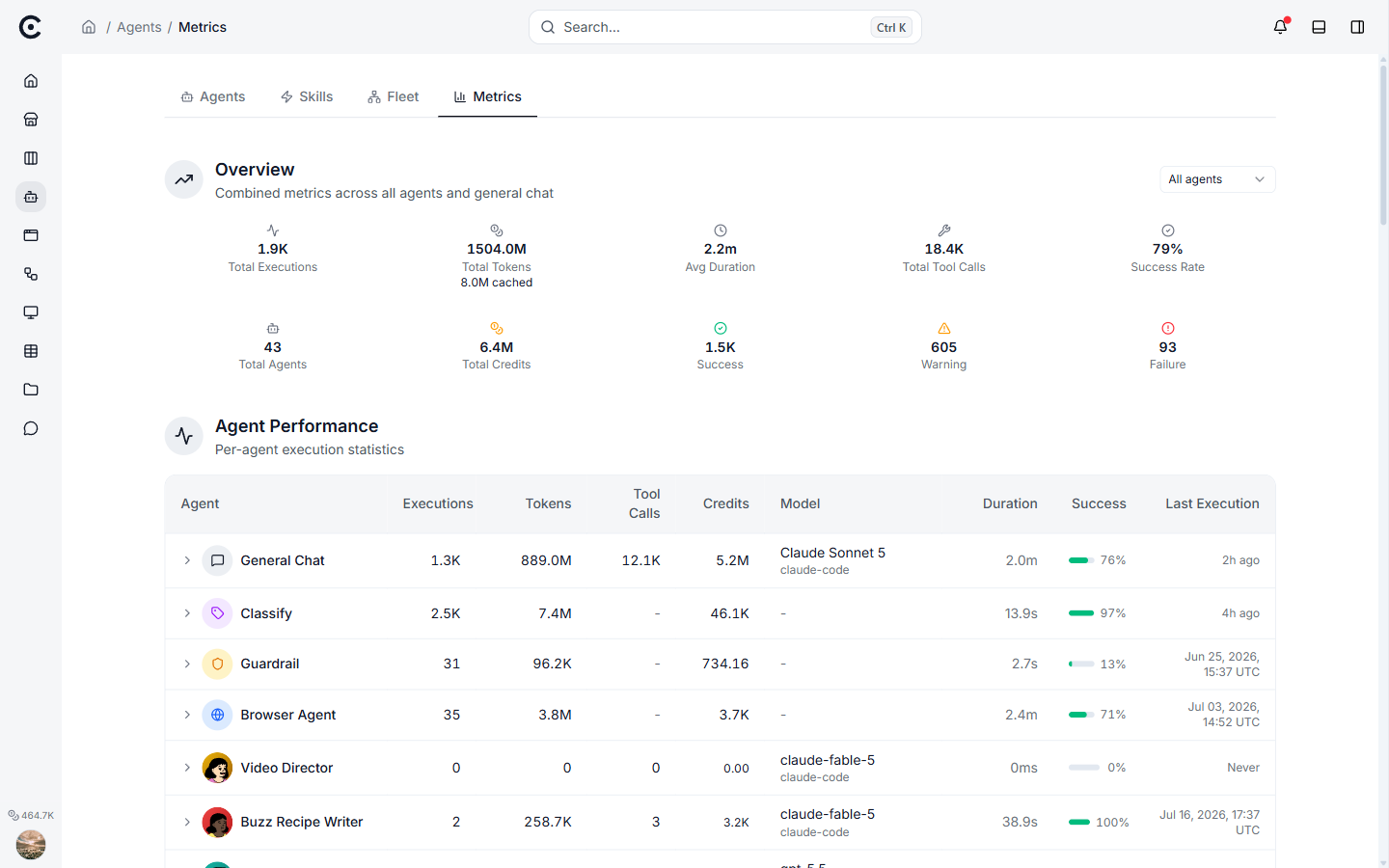
Per-agent spend, tokens and tool calls from real runs. This is the input to sizing: the number you set should come from your own distribution, not from a guess.
Why an iteration cap is a bad money cap
Lots of tools only let you cap the number of loops. It feels like a limit. Run the numbers and it barely is one.
| Step | Expected cost | Cost if it hits a 100-loop cap |
|---|---|---|
| Multi-tool research | about $0.27 | about $47 |
| Browser step | about $1.67 | about $101 |
A cap that allows sixty times the expected bill is not protecting you from anything. If your only control is a loop count, set it near what real work actually needs (a handful of calls for simple lookups, ten to fifteen for a comparison) rather than at a round number like 100.
Cheap steps: cap the input. Expensive steps: cap the money.
There is a floor below which a money cap physically cannot work.
A budget can only refuse the next call, so it needs room for at least a few calls before the ceiling. A rough rule: the budget should be at least three times the biggest single call the step could make. Below that, the first call can bust the cap and the budget never gets a turn.
For cheap steps, that floor is above what the step costs, so a money cap is theatre. What actually works there is limiting what goes in: cap how much text the step may be handed and how much it may write back. Do that and the worst single call drops by an order of magnitude, which pulls the floor down with it.
| Step type | The control that works | Why |
|---|---|---|
| Classify, short lookups | Cap the input size | The step is bounded already, money caps cannot bite |
| Long-document work | Cap the input size | One big call, so the input is the cost |
| Research, browsing, anything looping | Cap the money | Cost comes from repetition, which only money bounds |
A run budget is not the sum of the step budgets
This is where careful sizing usually falls apart.
Steps repeat. A step inside a loop over fifty items runs fifty times. A branch that fans out runs once per branch. So the run ceiling has to be worked out along the most expensive path through the workflow, counting repeats, not by adding up one budget per step drawn on the canvas.
And when a run does fan out, refuse it before it starts rather than interrupting it halfway. Cutting off a fan-out mid-flight leaves you a random subset of finished branches, and which ones survive depends on the order they happened to start in. Refusing up front gives you something you can retry.
How to pick the number
- Collect a few real runs. For each step, record tokens in, tokens out, how many tool calls, which model, and how it ended.
- Do not size off the average. Costs are lopsided: most runs are cheap and a few are expensive, so the average sits well below the middle of the risk. Sizing off it kills roughly a third of perfectly good work.
- Be honest about your sample. You need a few hundred runs before you can talk about a worst case with a straight face. Below that, size from the structural worst case (the biggest call the model could physically make) instead of pretending you have a distribution.
- Watch the compounding. A cap that kills 5% of steps sounds tolerable, until you have ten steps: that is 40% of runs hitting a cap somewhere. Per-step caps must be much looser than your run-level tolerance.
- Test it. Deliberately over-feed one step and confirm you get a clean refusal that names the limit. An untested cap is a guess with a number on it.
Questions people ask
What is a reasonable starting budget for one agent?
Take the expected cost of its most expensive step, multiply by three or four if it uses tools, and use that per step. Then set a run budget along the longest path, counting anything that loops.
Why not just set a generous budget and forget it?
Because a generous budget only fires after the damage. The value of a cap is the run it refuses, and a cap set at sixty times the expected cost will not refuse anything worth refusing.
My agent keeps hitting its budget. Raise it or fix it?
Look at what changed before you raise anything. Hitting a cap usually means the input got bigger or the agent started looping, and both are worth fixing rather than funding.
Do I need a budget per step, or is one per agent enough?
Per step, if the steps differ in kind. A classify step and a browser step differ by a thousand times in cost, and one number cannot be right for both.
How often should I revisit these numbers?
Whenever you change the model, the prompt size, or what the step is allowed to do. All three move the cost, and a budget set against last quarter's shape will either leak or strangle.
What to do next
Sizing only matters if the cap can actually stop a run. Check that side first: how to stop an agent from overspending covers what a real ceiling is made of and how to prove yours works.
Turn your niche data into a working automation
Describe the job in chat and Trinyx builds the workflow in front of you.
Start free