No-code AI automation: from one sentence to a working workflow

 By Sophie M. and Emma R.6 min read
You do not need to write code to build an AI automation. You describe what should happen, in a sentence, and you get a workflow you can look at, run, and change.
That is the whole idea of no-code AI automation: say the job out loud, keep the system you get.
The short version
- Describe the outcome, not the steps. The tool works out the plumbing.
- What you get back is a diagram, not a black box. Every step is on screen.
- You can refine it two ways: keep chatting, or open a step and edit it.
- Keep a human approval before anything irreversible reaches a customer.
- A few lines of code are still the right answer for exact, mechanical work.
Say what "done" looks like
People arrive with a habit from older automation tools: think in steps first, pick a trigger, wire field A to field B. That is backwards here.
Start from the outcome instead. One sentence is enough:
"Every morning, find new signups in my table and send each one a Slack welcome message."
That describes a goal and the shape of the work. The trigger, the loop, the lookup and the write-back are plumbing, and plumbing is what the tool is for.
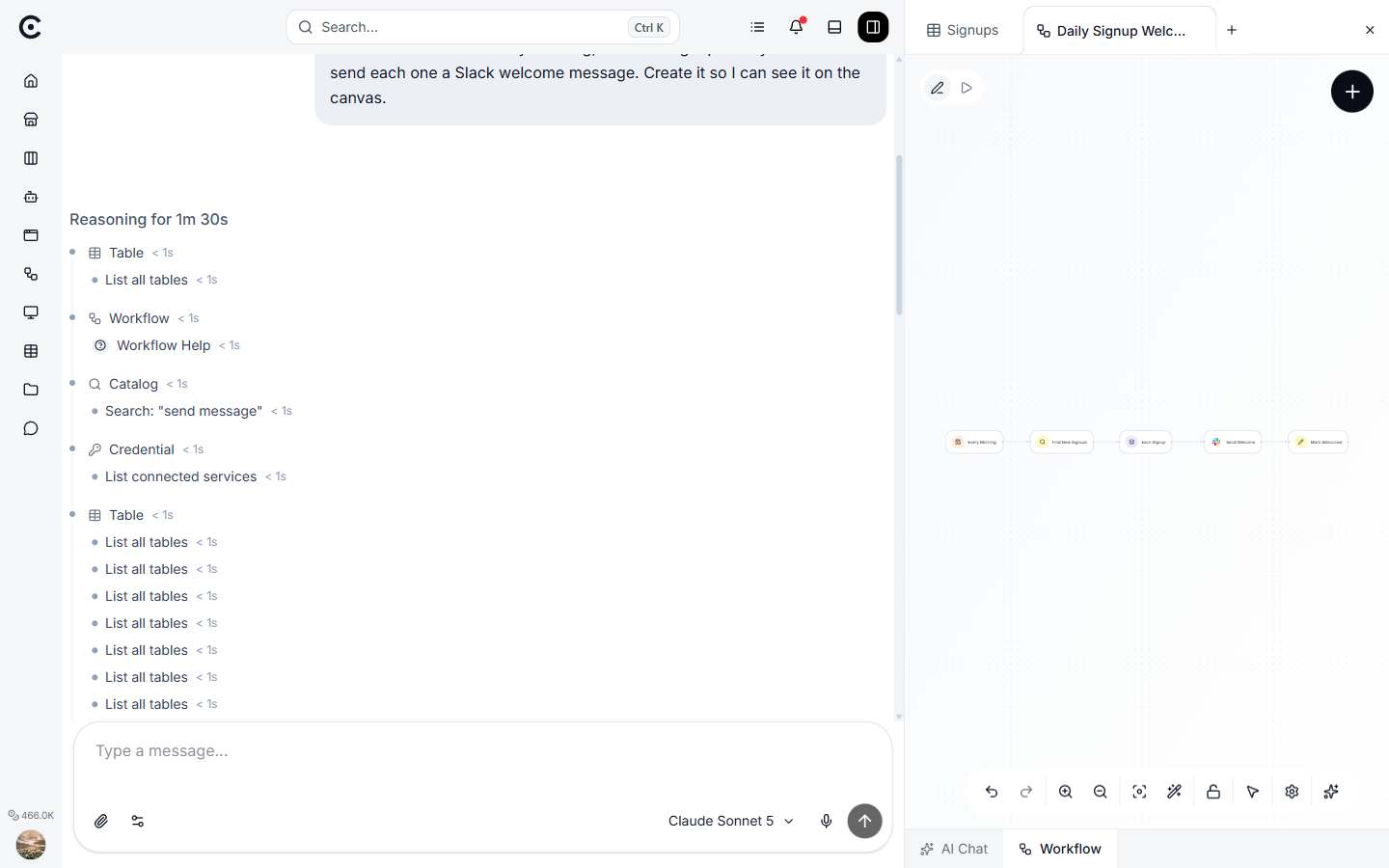
One sentence in, a readable workflow out. The request on the left, the generated steps on the right.
You get a diagram, not a black box
This is the part that matters more than it sounds.
A lot of AI tools hide the work. You type a request, something happens, and you hope. When it goes wrong there is nothing to inspect and nothing to fix, so your only option is to rephrase and try again.
| A prompt in a black box | A generated workflow | |
|---|---|---|
| Can you see the steps? | No | Yes, every one |
| Can you change one step? | No, only the prompt | Yes, open it and edit |
| Do you know why it did that? | Not really | The path it took is recorded |
| Does it run the same way twice? | Not guaranteed | The structure is fixed |
| Can you hand it to a colleague? | Only the prompt | The whole diagram |
If a step exists, it is on the canvas. Nothing is implied.
Change it by chatting, or by hand
The first version is rarely the last one, and refining is where no-code earns its place. You have two ways to do it, and you can mix them freely.
| You want to | Do this | Why |
|---|---|---|
| Add a whole branch | Keep chatting: "also tag anything mentioning a refund as urgent" | Structural changes are faster in words |
| Fix wording or a category | Open the step and edit it | Precise, no reinterpretation |
| Reorder steps | Either | The diagram is the source of truth |
| Change a threshold | Open the step | You want the exact number, not a paraphrase |
Both paths write to the same diagram, so neither locks you out of the other.
When you still want a line of code
No-code covers most of the work. Pretending it covers all of it is how these tools earn a bad reputation.
Reach for a code step when the logic is mechanical and exact:
- Reshaping data into the precise structure the next step expects.
- Date maths, a calculation, a threshold with no fuzziness in it.
- Parsing a format nothing else recognises.
Use plain language for judgment. Use a few lines of code for exactness. That split holds up in practice.
A worked example: support inbox triage
Same idea, slightly bigger job. A support email arrives and you want it sorted, answered and checked.
| Step | What happens | Who decides |
|---|---|---|
| Trigger | A new email lands in the support inbox | The inbox |
| Classify | A small AI step reads it and returns one label: bug, billing, or general | The model, on that email only |
| Branch | The diagram splits three ways on the label | The structure, not the model |
| Draft | Each branch writes a reply in the right tone | The model |
| Review | The draft waits in a queue for a person | A human, always |
| Log | What came in, the label, the branch, the draft, who approved | Recorded automatically |
Notice which decisions belong to the model and which belong to the diagram. The model reads and judges. The structure decides what happens next. That split is what keeps the thing predictable, and it is covered in more depth in workflow versus one big agent.
Questions people ask
Do I need to know what a trigger or a node is?
No. It helps later, when you start editing steps directly, but you do not need any of it to get a first working version.
What if the generated workflow is wrong?
Say what is wrong and it gets rebuilt, or open the offending step and fix it yourself. Because you can see every step, "wrong" is usually a specific step rather than a mystery.
Is this just a prompt with extra steps?
No. A prompt is one call and one output. A workflow is a fixed structure with separate steps, real branches, and a record of the path each run took, which is what lets you debug it a month later.
Can it touch real systems, like email or Slack?
Yes, that is the point. Put a human approval before anything you cannot undo, such as sending to a customer or spending money.
How much does running it cost?
Less than handing the whole job to one autonomous agent, in most cases, because each step only sees what it needs. How much less depends on how many steps the job takes: the cost comparison works it out with the numbers shown.
What to do next
Pick one chore you do every week, write it as a single sentence, and see what comes back. Then change one thing about it. That is the whole loop, and it takes about ten minutes.
Turn your niche data into a working automation
Describe the job in chat and Trinyx builds the workflow in front of you.
Start free