How to turn a dataset into a workflow that runs itself

 By Camille R. and Noah Schmidt7 min read
A dataset does nothing until something reads it on a schedule, decides what changed, and acts. This is how to get from a file you check by hand to a workflow that checks itself.
The example throughout is a price watch: track a handful of products, notice when one moves, and tell someone before it costs you money. The shape works for anything with a heartbeat.
The short version
- Pick a source that changes on a rhythm you can predict.
- Clean it once, right where it comes in, so every later step can trust it.
- Compute the decision first, then branch on the decision, not on raw values.
- Put a human approval in front of anything you cannot undo.
- Write the result back, so the next run knows what the last one did.
The build, in six steps
| Step | What it does | Why it is there |
|---|---|---|
| 1. Schedule | Fires every hour | The heartbeat. Nobody has to remember to start it |
| 2. Fetch | Reads the live source | This is where fresh data enters |
| 3. Clean | Reshapes it into the same few fields every time | Everything downstream can stop guessing |
| 4. Look up | Checks whether you have seen this item before | Stops duplicates, and gives you last week's number |
| 5. Decide | Has it moved more than 5%? | The actual question |
| 6. Approve, then act | A person confirms, then the alert and the write happen | The irreversible bit, gated |
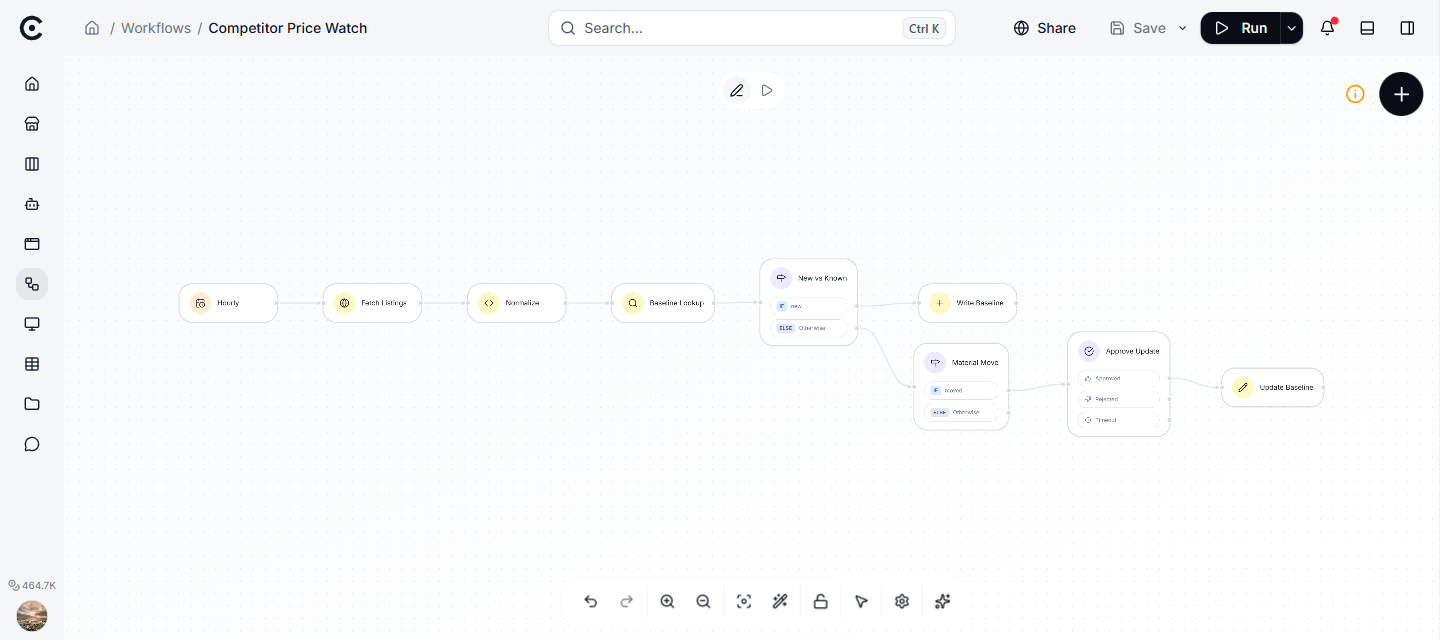
The whole build on one canvas: from the hourly trigger on the left to the approval-gated write on the right.
Step 1: pick a source with a heartbeat
Automate data that changes on a schedule you can name. Not "weekly" but "a CSV per supplier, by email, every Monday before 9am". That precision decides your trigger.
If the source almost never changes, you do not need a workflow. You need a lookup, and you should save yourself the effort.
Step 2 and 3: fetch, then clean once
Raw sources are messy. Column names drift, dates arrive in three formats, one supplier writes "unit price" and another writes "price/ea".
Do the cleanup in exactly one place, right where the data enters. Decide the shape you want first (for the price watch: product, price, currency, seen-at), then make every source produce that shape and nothing else. Every step after it gets simpler, because it can trust its input.
One warning that catches everybody: a failed fetch often arrives looking like a success. Plenty of services return an error message inside a perfectly normal-looking response. Check that what came back is really the data before you pass it on, or the failure travels silently down the whole workflow.
Step 4 and 5: decide, then branch
The point of the workflow is a decision, so make the decision explicit.
The trap is branching on the raw value. You do not care that the price is 12.40. You care whether it rose more than your tolerance since last time. So compute that first, then branch on the answer.
This also has a practical side. Filters that look numeric are often compared as text behind the scenes, and text sorts differently from numbers: "100" comes before "9". A filter that reads price greater than 9 can silently miss the 100 you cared about. Fetch the previous value, do the maths in an explicit decision step, and branch on that.
Step 6: gate the irreversible step
The last step should do something real: send the alert, update the row, file the ticket, prepare the order.
When that action is expensive or one-way, put a human approval in front of it. The run pauses, waits for a person, and then continues exactly where it stopped. Cheap and reversible actions can run unattended. Anything that reaches a customer or spends money gets a gate.
Two things worth knowing about pausing. Approving twice does nothing bad: the first answer wins. And the next scheduled run does not trample a decision somebody is still thinking about; each run keeps its own results.
The one guard that makes a repeating workflow safe
A schedule that fires hourly runs the same read hourly. Without a guard, it inserts the same row every hour and your table fills with duplicates.
The pattern that fixes it, on any tool: look first, then decide, then write. Search for the item. If the count is zero, it is new, so write it. If not, it already exists, so update instead. Never insert unconditionally when the same item can be fetched again.
That lookup does double duty. It is your duplicate guard, and it is also where last week's number comes from, which is what makes "has it moved?" answerable at all.
Four traps that cost people an afternoon
| Trap | What you see | What is really happening |
|---|---|---|
| Silent empty result | A step returns nothing, no error | The data is nested one level deeper than you expected |
| Failed fetch that looks fine | Everything downstream is wrong | The error came back inside a normal response |
| Number compared as text | A threshold quietly misses cases | "100" sorts before "9" |
| Duplicate rows every hour | The table grows and grows | No look-first guard before the write |
None of these throw an error. That is exactly why they cost an afternoon.
Prove every branch before you call it live
Do not ship on the happy path. Run each case on purpose and check what the workflow actually did.
| Test | What you make happen | What should happen |
|---|---|---|
| New item | An item with no history | Exactly one row written |
| No change | A known item, price steady | Nothing sent, nothing written |
| Real change | A known item, price up 10% | The run pauses for approval |
| Rejected | Refuse the approval | No alert, no write |
| Run it twice | Fire the schedule again | Row count stays the same |
If the "real change" case completes without pausing, your threshold is being evaluated somewhere you did not intend. That is the failure worth catching before it is live rather than after.
Questions people ask
How often should it run?
Match the source. Hourly for prices, daily for a report, weekly for a supplier sheet. Running more often than the data changes just costs you calls and tells you nothing new.
Where do I keep the history?
In a table the workflow reads and writes itself. That is what turns a set of separate runs into something with a memory: it knows what it already handled, and it has yesterday's number to compare against.
What happens if a run fails halfway?
The run stops at the step that failed and the record shows which one it was and what it received. You fix that step and rerun, rather than reasoning about the whole thing.
Do I need a human in the loop?
For anything irreversible, yes, at least until you trust it. Auto-sending on a bad parse is how automation earns a bad name. Start with the gate and remove it later if the evidence supports it.
What to do next
Choose one source you already check by hand every week. Write down the decision it drives, the threshold you use, and what you do when it trips. That is the workflow, and you have already designed it. Then see what to log so you can answer for what it did.
Turn your niche data into a working automation
Describe the job in chat and Trinyx builds the workflow in front of you.
Start free